
Ask Questions and Analyze with Hey Syncly

What is this feature?

Hey Syncly lets you ask questions about the analysis data in your workspace and generate AI-powered answers. You can review the answers and, when needed, save them as Reports.

When should I use it?

  • When you want to quickly summarize analysis results
  • When you want to ask a question about specific filter conditions
  • When you want to draft a Report or analysis comment
  • When you want to revisit a previous question session

Before you begin

  • You need permission to view the workspace.
  • Your question should include the analysis target filters and the question itself.
  • Answer generation runs asynchronously, so it may take some time.

How to use it
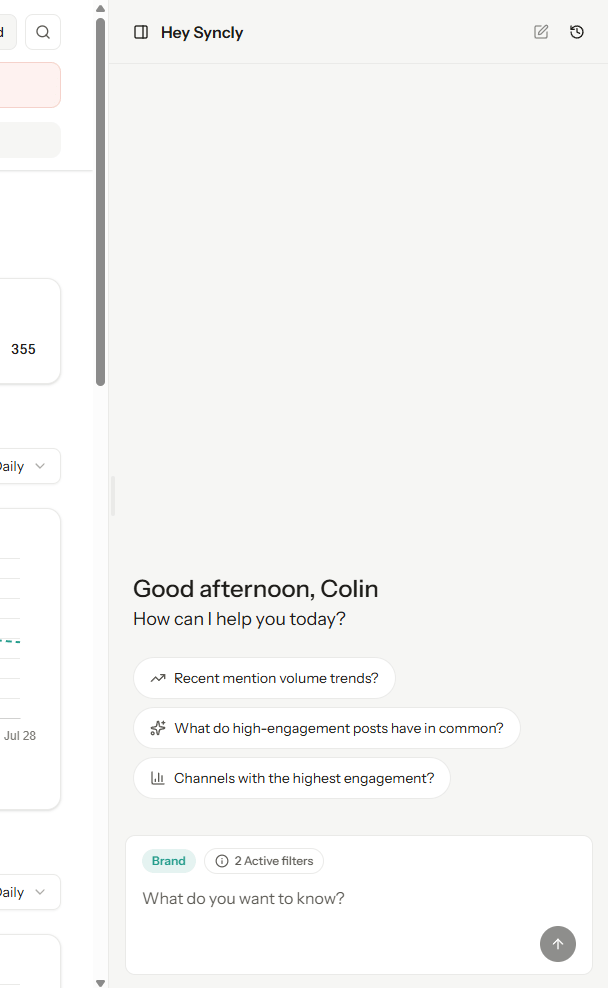
1. Start a new question

  1. Open the Hey Syncly page.
  2. Select the conditions or filters you want to analyze.
  3. Enter your question.
  4. Submit the question. A new session is created and answer generation begins.

2. Continue an existing session

  1. Select a previous conversation from the session list.
  2. Enter a follow-up question.
  3. Wait for answer generation to complete.

3. Check generation status

While an answer is being generated, its status may appear as processing.
StatusMeaning
ProcessingThe AI answer is being generated.
CompleteThe answer is ready to review.
FailedCheck the question, filters, data status, or processing error.

4. Rate an answer

You can leave a vote on an answer to provide quality feedback.

5. Save as a Report

Completed REPORT-type answers can be saved as Reports. Saved Reports can be viewed and shared from the Report list.

Frequently asked questions

The answer does not appear right away.

Hey Syncly answers are generated asynchronously. Please wait until the status changes to Complete.

I cannot see a previous conversation.

The previous conversation list shows conversations you created. Conversations created by other users may not be visible.

Can every answer be saved as a Report?

Answer saving follows the save options available in the product interface.

Troubleshooting

SituationWhat to check
Question submission failsWhether the filter exists, whether a question was entered, and permissions
Status stays processing for a long timeData size and external processing delays
Session lookup failsWhether the session was created by you and whether you have workspace permissions
Saving as a Report failsWhether the message is complete, whether it is a REPORT type, and permissions